Preparing average monthly runoff data for the conterminous US
I promised that I would provide some insight into how I prepared the data for our average monthly runoff map, and Will Edmunds will provide a follow up post on how he made the map.
I took two approaches for preparing the data: a database centric approach, and the Esri approach that used geoprocessing tools. Both work, so I wanted to give you the option of doing it either way.
Obtaining the Data
The first thing I needed to do was obtain the data from the USGS water data site. The site is very slow, so you have to be patient. So the first thing I did was download the computed runoff for all hydrologic units for the monthly time period and a hydro unit level of 2.

the result of a delimited text file that had the HUCs represented as columns, and the year and month as rows (195610 would be October, 1956):

Processing the data with SQL
Now I had to structure the data to get it into table form, and to do that, I used SQL inside of Manifold GIS:
The code grabs the two rightmost characters in the [date] field (right([date],2) and considers that the month. So, for October 10, 1956, we would grab the last two digits of the value 195610. The next thing I did in the query was to obtain the average values for each of the 18 HUC2 watersheds. Average is an aggregate clause, so you can actually split those averages up for unique values. In this case, I used the GROUP BY command to obtain the 18 averages for each month: GROUP BY right([date],2).
The query returned a table with each HUC listed, and all 12 averages for each month:

I then changed the column names to match the names of the HUC. In actuality, I could have issued the SQL query to create the names as follows:
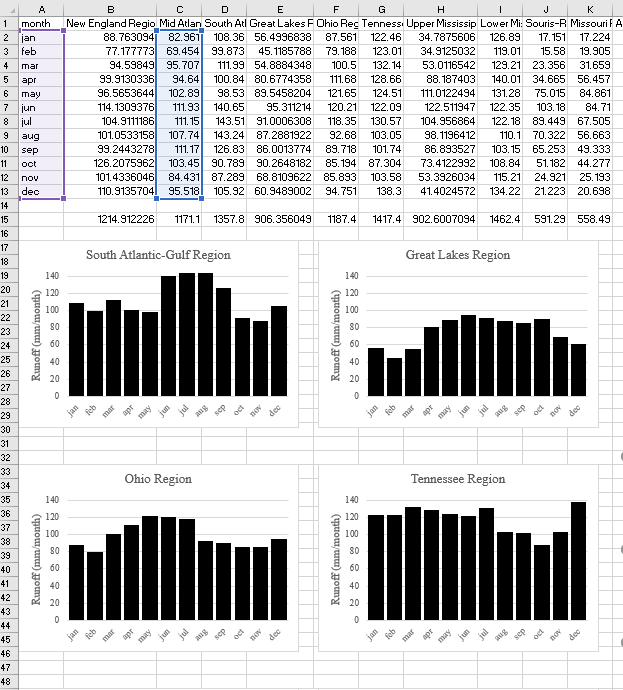
avg([01]) AS "New England" .... avg([02] AS "Mid Atlantic" ... and so on. I then wrote a VB script to create the graphs in Excel that Will used in his map.
Processing the data in ArcGIS Pro
While I prefer the SQL version, it isn't terribly difficult to achieve the same results in ArcGIS Pro. I had to import the delimited file into an object class (i.e. a table), and add a new field (mnth). That was only two steps to complete. Then, I calculated the right two values in the date field using the Calculate Field tool and the modulus operator:

From there, we replicated the SQL GROUP BY command using the Summary Statistics tool (in this case, I'm only showing the first 4 HUCs):

the result yielded a table like the following that could be imported into Excel where I created the graphs:

You'll notice that the column names are a bit wonky, so I had to go in and clean them up.
The Takeaway
It's no secret that I'm an SQL guy, and really appreciate the elegance of it. But, you can also see that Esri has the tools in ArcGIS Pro to perform the same kinds of functions. If I wanted to spend 20 minutes or so, I could have written it in a python script and called the necessary geoprocessing functions.
In the next post, Will is going to explain what he did to make the map in ArcGIS Pro.


nice work